What the watch shows
The sync screens appear when you tap Save on the watch and the watch has sets that have not been confirmed by the phone.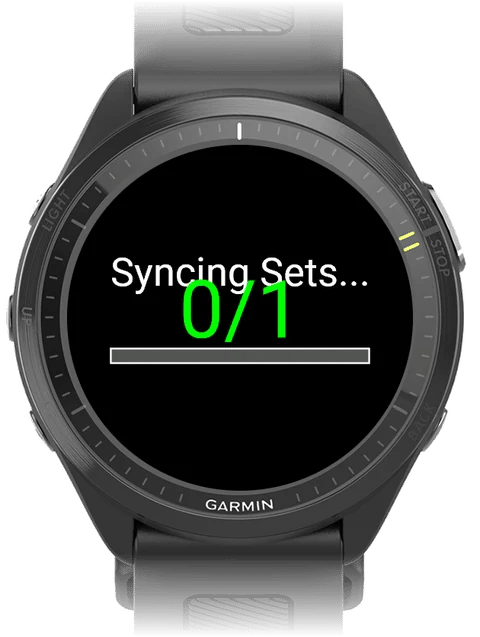
Fix a sync problem
1
Wait for the sync to finish
While the watch shows Waiting for phone or Syncing Sets…, keep the watch and phone close together, with Garmin Connect running on the phone. Back does not close the screen during a sync.
2
Retry
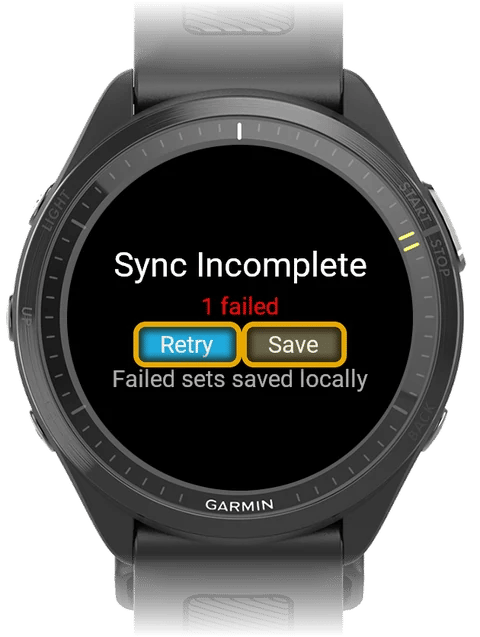
If the watch shows Sync Incomplete, check that the phone is nearby, then tap Retry. The watch sends only the sets that are still unsent, and tries each one several times.
3
Save
If the sets still do not send, tap Save. The watch saves the workout and shows the summary. Back does the same thing on this screen. Sets that were not sent stay on the watch.
What happens to sets that were not sent
- The sets stay on the watch. Kilo does not send them again when you open the app.
- The next time you tap Save on the watch, Kilo tries to send every unsent set again. This includes sets from earlier workouts.
- Discard & Exit deletes every unsent set on the watch, including sets from earlier workouts. Kilo does not ask you to confirm this.
- The watch keeps up to 50 unsent sets. When it is full, it deletes the oldest set. It does not show a message.
- When the app starts, the watch deletes unsent sets that are older than 48 hours.
What your phone shows
- After you choose Start on Watch, the phone shows Waiting for first set from watch until the first set arrives.
- If the phone cannot reach the watch, the routine Start dialog shows No watch connected under Start on Watch, and you cannot choose that option.
- A set that arrives when no workout is open on the phone is not saved and is not confirmed. The watch keeps that set. The phone does not show a message about it.
Waiting for phone does not go away
Waiting for phone does not go away
Bring the phone closer to the watch and check that Garmin Connect is running. Then tap Retry after the watch shows Sync Incomplete.
Sets from an earlier workout appear in a new one
Sets from an earlier workout appear in a new one
Unsent sets stay on the watch until they are sent or discarded. Tap Discard & Exit only when you no longer need the unsent sets. Discard deletes all of them.
Next steps
Getting started with Kilo + Garmin
Set up the phone app and the watch app, and send your first routine.
Log a workout on your watch
Learn every screen and button in the Kilo watch app.