> ## Documentation Index
> Fetch the complete documentation index at: https://thekiloapp.com/help/llms.txt
> Use this file to discover all available pages before exploring further.
# Kilo Free vs Pro
> What you get in the 30-day Pro trial, what stays free after it, what Pro unlocks, and how to upgrade, restore or manage your subscription.
Every new install of Kilo starts with full **Pro** for 30 days. After that, Kilo moves to **Free** unless you subscribe to Pro through Google Play. Your workouts and history stay on your phone either way.
## The 30-day trial
* The trial starts on the day you install Kilo. It does not need a card.
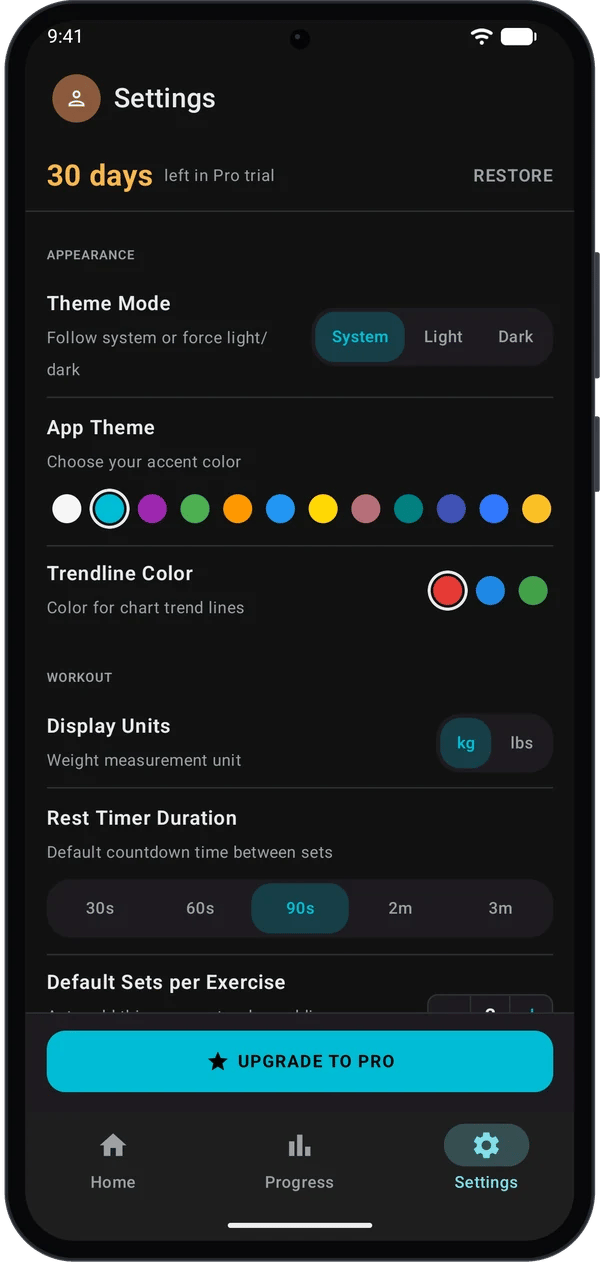
* Open **Settings**. The account line at the top shows how many days are left, for example **30 days** and **left in Pro trial**.
* When the trial ends, Kilo shows a one-time **Welcome to Kilo Free!** message. It lists what you can still do and offers an upgrade.
## Free and Pro compared
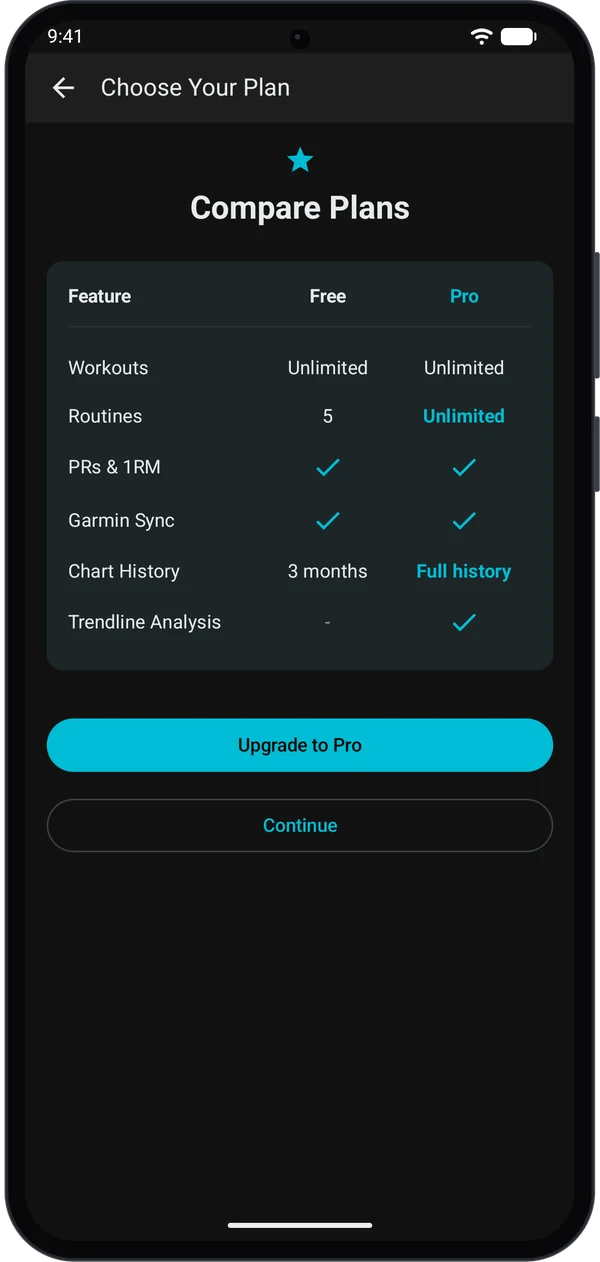
| | Free | Pro |
| - | - | - |
| Workouts | Unlimited | Unlimited |
| Routines | 5 | Unlimited |
| PRs and 1RM | Included | Included |
| Garmin sync | Full integration | Full integration |
| Chart history | **1M** and **3M** ranges | **1M**, **3M**, **6M** and **All** |
| Trendlines | Not available | Included |
Free is not a cut-down logger. You keep unlimited workouts, PRs, 1RM and the full Garmin integration.
### What you see when you reach a Free limit
* **Routines:** if you already have 5 routines and try to create another, Kilo shows **Routine Limit Reached**. Tap **Upgrade** to see the plans, or **Maybe Later** to close it. Your 5 routines are not deleted.
* **Charts:** on Free, the **6M** and **All** ranges and the trendline option are locked. They stay tappable. Tapping one opens the plan screen.
## Upgrade to Pro
Go to **Settings** and tap **UPGRADE TO PRO** at the bottom. The same screen opens when you hit a limit or tap a locked item.
Kilo shows **Choose Your Plan** with a **Compare Plans** table.
To stay on Free, tap **Continue** or the back arrow instead.
The **Kilo Pro** screen lists the plans Google Play offers for your account. If an **Annual** plan is offered, it is selected for you. Tap another plan to change it, then tap **Subscribe** and finish in the Google Play sheet.
Kilo shows **Welcome to Kilo Pro!**. In **Settings**, the account line now reads **Kilo Pro** with **active**, and the **UPGRADE TO PRO** button is gone.
You now have Pro: unlimited routines, all chart ranges and trendlines.
Prices come from Google Play and depend on your country, so they are not listed here.
## Restore a purchase
Use this if you reinstall Kilo, get a new phone, or Pro does not show after you paid. Sign in to the same Google account that bought Pro.
* On the **Kilo Pro** screen, tap **Restore Purchases**.
* Or in **Settings**, tap **RESTORE** at the top right.
The **Kilo Pro** screen tells you the result. It shows **Purchases restored!** or a "No previous purchases found" message. For this reason, restore from the **Kilo Pro** screen, not from **Settings**.
## Manage or cancel your subscription
1. Open **Settings**. When Pro is active, the top line shows **MANAGE**.
2. Tap **MANAGE**. Kilo opens the subscription manager. Use it to see your subscription and to cancel or change it.
3. You can also manage subscriptions in **Google Play** (profile icon, then **Payments and subscriptions**, then **Subscriptions**).
Subscriptions renew automatically until you cancel. If you cancel, you keep Pro until the current period ends. After that, Kilo moves to Free.
## Quick fixes
Check that you use the Google account that paid. Tap **Restore Purchases** on the **Kilo Pro** screen. Check your connection and try again.
Kilo could not reach Google Play. Check your connection and that Google Play is up to date. Close the screen and open it again.
Your routines stay. You cannot create new ones until you are under 5 or upgrade.
They are Pro. On Free you see **1M** and **3M**. Tap a locked range to see the plans.
## Next steps
Set up Kilo and log your first workout.
Garmin sync is in both Free and Pro.
This documentation is built and hosted on [Mintlify](https://mintlify.com), a developer documentation platform.